Skip to content

One tool for your charge points.

Every request becomes a ticket tracked to the signed report; every charge point keeps its history.
Request a technician
Film transcript (French)

Votre borne est en panne, et les techniciens que vous appelez sont déjà pris.

[À l’écran, sur fond musical] Demande vérifiée et chiffrée, puis proposée aux techniciens éligibles.

Un professionnel disponible accepte la mission.

Vous savez qui intervient, et à quelle heure il part.

Sur place, il lance un essai de charge et consigne ce qu’il constate.

Vous recevez le rapport d’intervention : les photos, les mesures, le résultat de l’essai et les suites éventuelles.

Vous le validez depuis votre plateforme, ou par téléphone.

Demandez une intervention.

ChargeTeam. Chaque borne a son technicien.

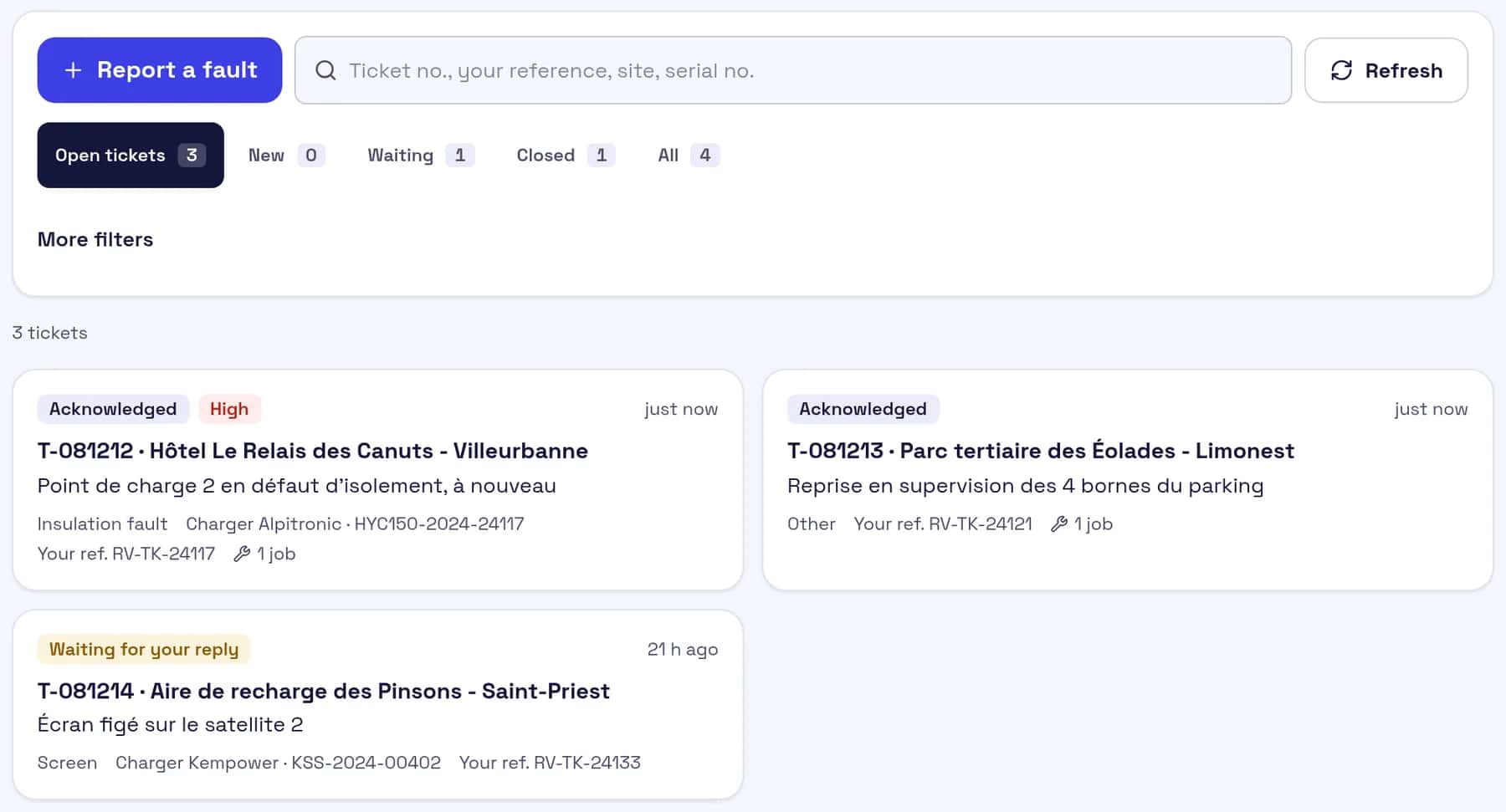
Screenshot of the ticket queue: three open tickets with status, priority, charge point and customer reference.

From fault to signed report.

A job in the application, screen by screen, in order.

  1. 20:44

    The fault is reported

    The customer's own tool opens a ticket through the API: charge point, symptom, reference. Ticket T-… follows the fault until it is fixed.

  2. 21:54

    Nearby technicians are alerted

    The job goes to the closest qualified technicians. They see the town, the distance and the fault; the site name only appears once they accept.

  3. + 7 min 43

    A technician accepts

    The first to accept takes the job and picks the visit date. Dispatch sees who, when, and how fast.

  4. 22:04

    The customer signs on site

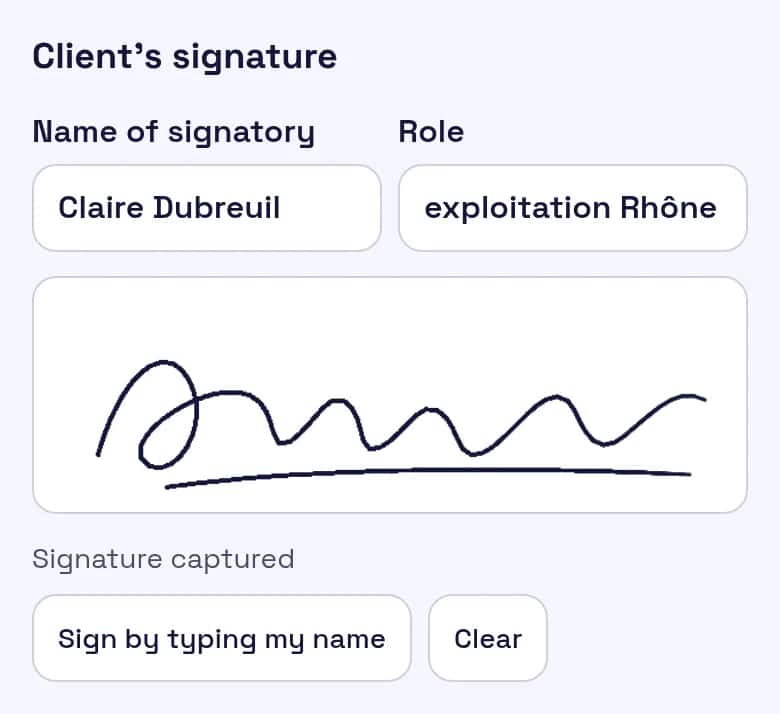
    Before and after photos, findings, work done, result. The person on site signs with a finger, with their name and role.
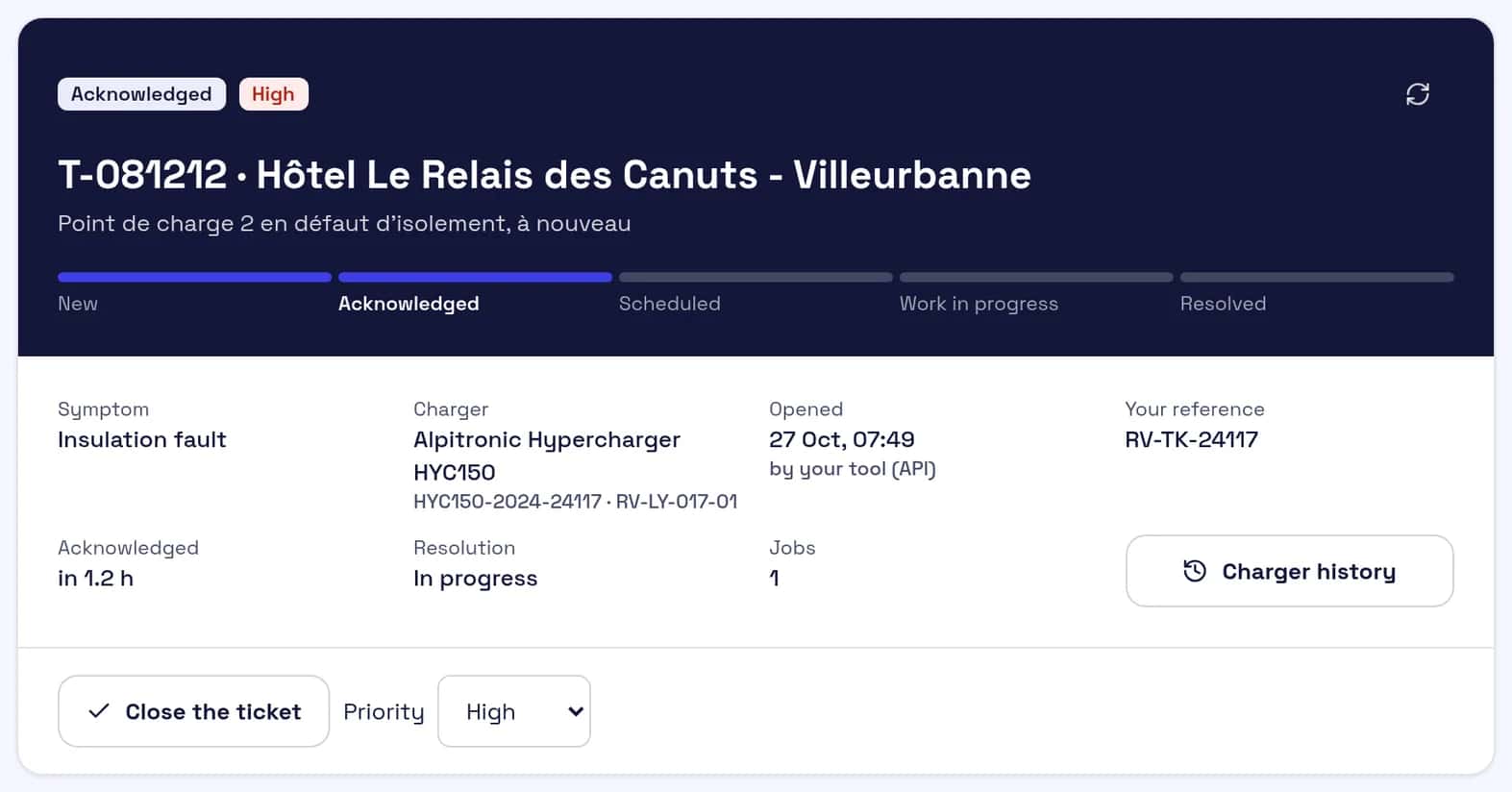
Screenshot of a ChargeTeam ticket: a partner hotel, charge point 2 with an insulation fault, high priority, opened by the customer's tool, one linked job.
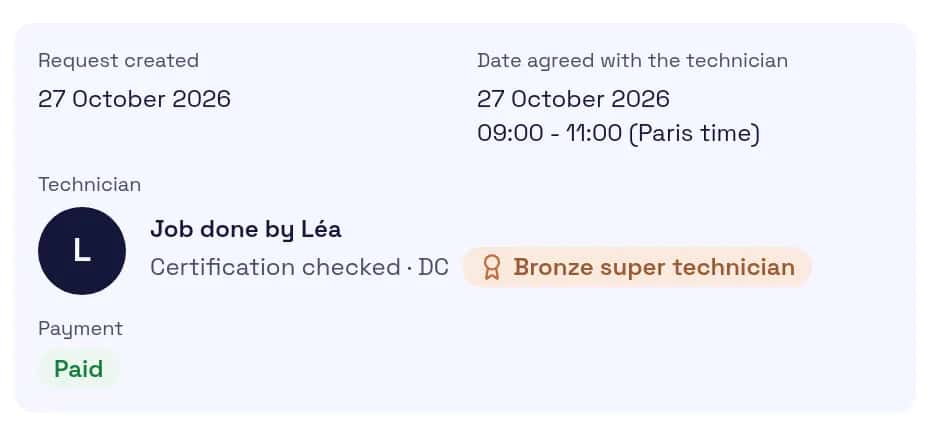
Screenshot of the client space: the job accepted by a technician of the network, slot agreed and technician named.
Screenshot of the technician app: customer signature on site for the service report, signed by Claire Dubreuil, operations for a regional operator.
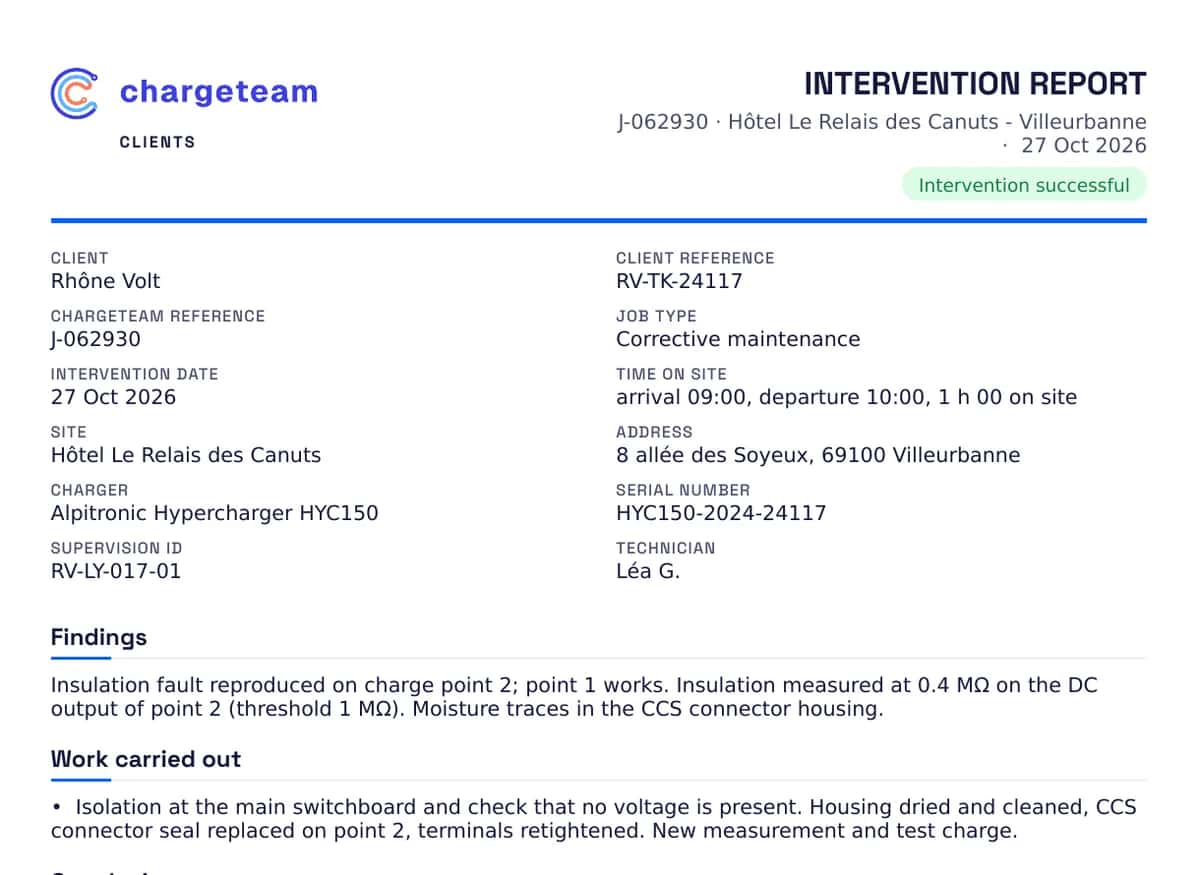
Screenshot of the PDF report with the customer's logo: references, charge point, findings, work done and conclusion.
Report approved

The PDF goes out with your logo

Once reviewed by the team, the report is issued with your logo, your ticket reference, the charge point and its serial number.

A signed report, with your logo

The technician has the person on site sign, or records why nobody signed. The approved report is issued as a PDF with your logo and your reference.

A fleet you can follow, not a pile of emails.

Charge point operators, retailers, fleet managers and manufacturers: one space to request, follow and find every job.

Tickets, not lost threads

Every request gets a T-… number: messages with the team, attachments, linked jobs and their reports. The ticket moves on by itself as the job is scheduled, in progress, then resolved.

Every charge point's history

By site and by charge point, over 3 to 24 months: recurring faults, first-visit fix rate, response and resolution times. CSV export in one click.

A register of your sites and charge points

Import your sites from CSV or Excel. Each charge point has its health record: visits, last and next preventive visit, fault codes. Preventive maintenance is set per site or per charge point, every 1 to 36 months: three weeks before it is due, a ticket opens and we organise the visit.

Screenshot of the fault history: 4 issues, median response 48 min, resolution 5 h, one recurring fault on a charge point.

Also included

  • Your company, several accountsOne or more administrators and requesters invited by email, under the same company account.
  • A tracking linkA fault reported online or through the API gets a tracking link, no account needed, refreshed every 30 seconds.
  • Response times set by contractWithout a contract, the lead time is confirmed when we take the job. Under contract, response and on-site times are set by priority.
  • All brands, AC and DCA report guided by equipment and fault, with measurements and photos on every visit.

The right technician, as close as possible.

Our team sees on the map who is qualified and available near the site, sends the job in one click and reviews every report before it reaches you.
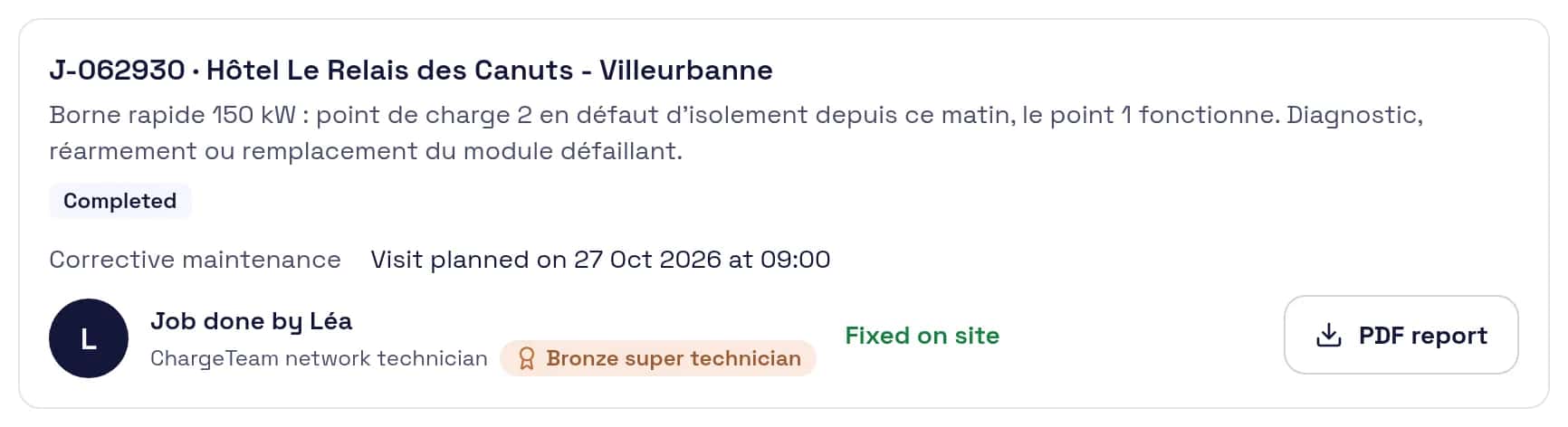
Screenshot of the client space: job completed, fixed on site, PDF report available.

Works with your tools through the API and webhooks.

Your ticketing tool or monitoring system creates requests and receives every step of each job, with no retyping.

Read the developer docs
API v1
Requests, tickets and their messages, sites, reports.
Signed webhooks
HMAC-SHA256 signature on every delivery. Ten events: request received, job scheduled, technician assigned then on site, job completed or cancelled, report approved, ticket created, ticket updated, new message.
Monitoring
Already connected to the Wattena monitoring system: a lasting alarm on a charge point creates a request, or adds to the ticket already open for that charge point.

The whole job in your pocket.

Jobs near you, the charge point's history, a technical assistant and your payments, in an app you install straight from the browser.

Join the network
  • Jobs near you

    Town, distance, fault and deadline before you accept.

  • You pick the date

    Accept for the day that suits you, up to the job's deadline.

  • The charge point's history

    As soon as you accept, you see previous visits and the faults that keep coming back on that charge point.

  • Aixo, your technical assistant

    A question, a photo or a fault code: Aixo searches manufacturer manuals and field notes. Always check before any live work.

  • Paid within 7 days

    Bank transfer within 7 days of your report being approved. Your earnings and payments are tracked in the app.

  • €20 per referral

    Invite a technician with your link: €20 for you when they complete their first approved job.

A charge point to get back in service?

Describe the fault in two minutes. Price and lead time are confirmed before any work starts.